Runbook: Ikyu Scraping Blocked — Forced Password Change on Dashboard
| Service | Channel Integration |
|---|---|
| Owner Team Slack Handle | @bnl-channel-integration @bnl_Link-japan-support |
| Team's Slack Channel | #bnl-channel-connection-alert |
Table of Contents
Important Links
| Ikyu Dashboard | https://www.ikyu.com/accommodation/ap/AsfW10101.aspx |
|---|---|
| Control Panel Channel Manager | https://admin.bookandlink.com/control_panel |
1. Triage
The goal of this section is to confirm whether the Ikyu scraping has truly stopped due to a forced password change, or if there is another cause.
-
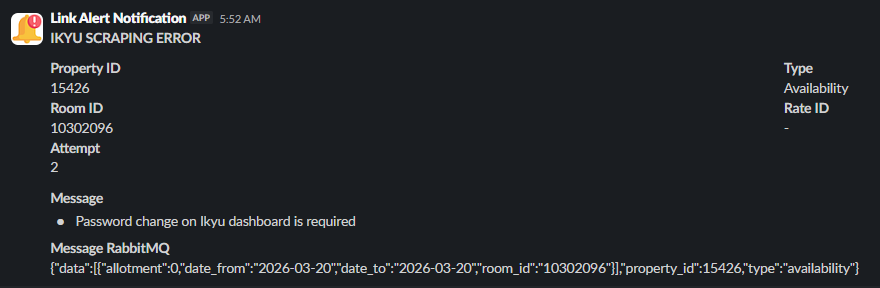
1. Check the Slack notification from the scraper:
- Open the Slack channel that receives notifications from the Ikyu scraper.
- Look for the latest notification mentioning that scraping failed due to a forced password change on the Ikyu dashboard.
-
2. Verify directly on the Ikyu Dashboard:
- Open the Ikyu dashboard: https://www.ikyu.com/accommodation/ap/AsfW10101.aspx
- Attempt to log in using the stored credentials.
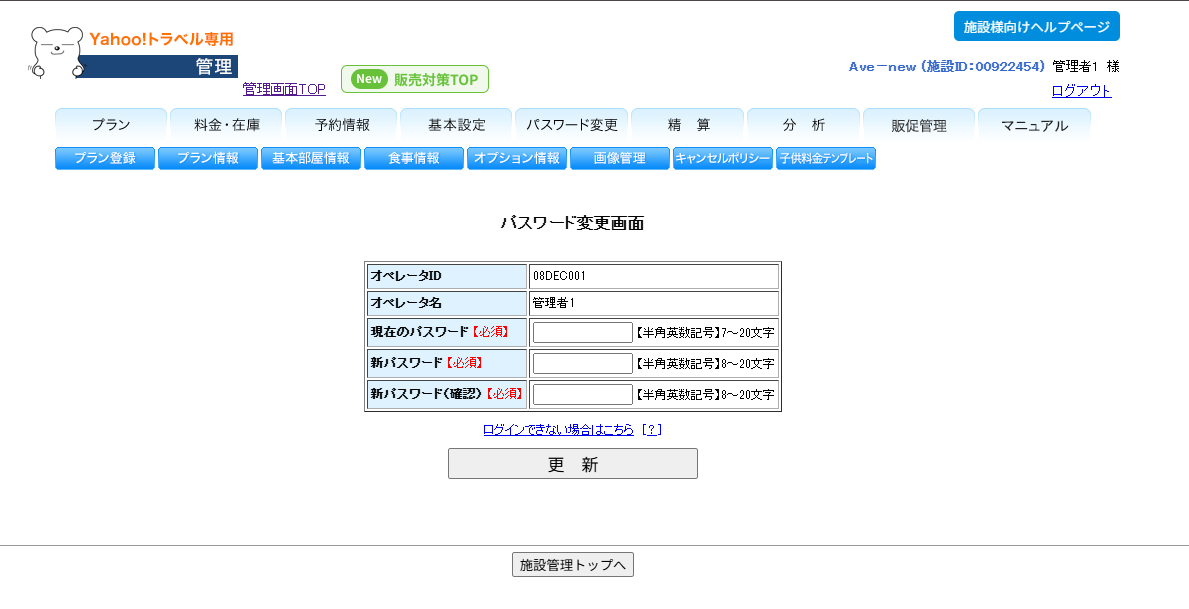
- Does a prompt / page appear that forces a password change before you can proceed?
- ✅ YES → This is the root cause. Proceed to the Decision Point.
- ❌ NO → Login succeeds normally; this is likely not a forced password change. Check other possible causes in the scraper logs.
-
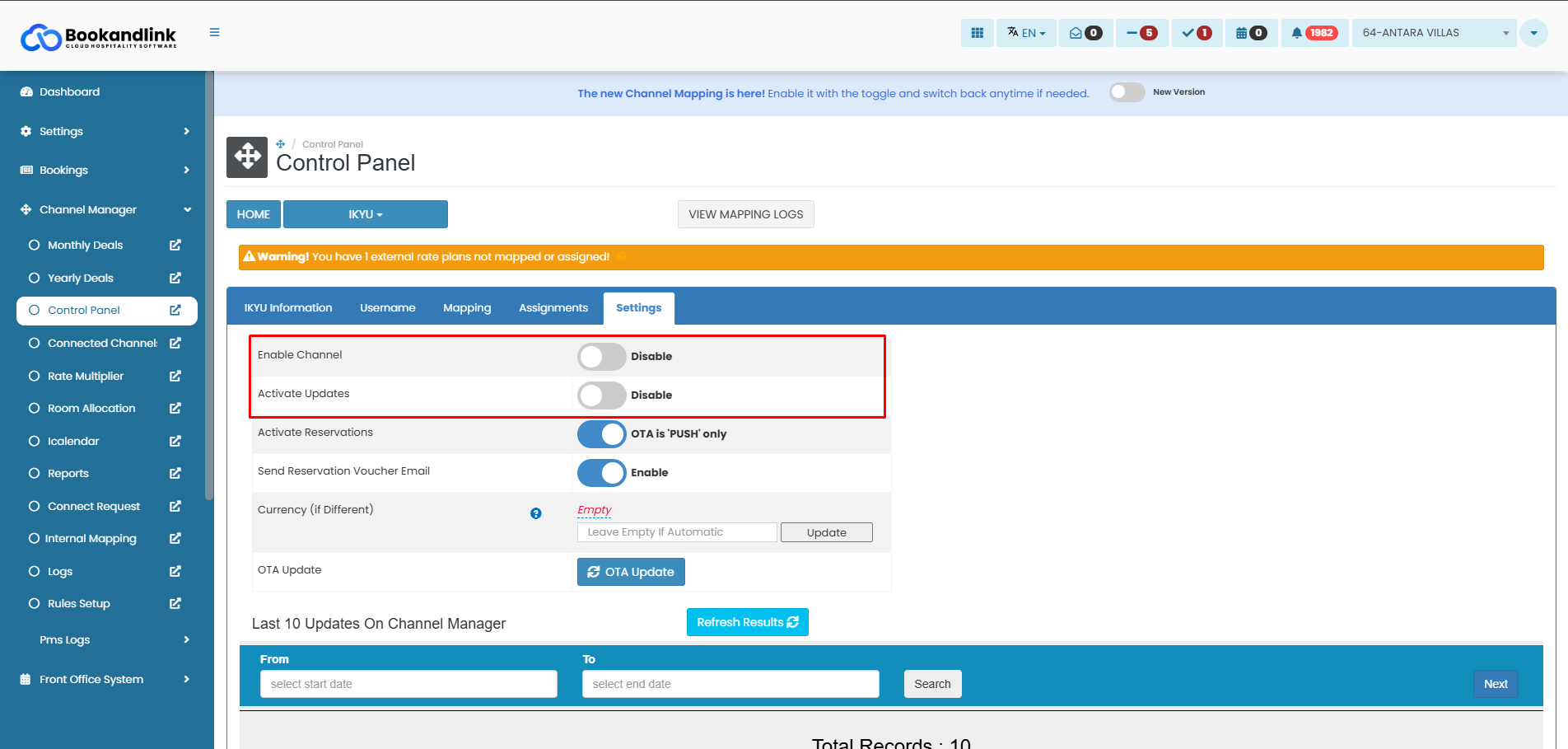
3. Check the status of Enable Channel and Active Updates in the Control Panel:
- Open the Channel Manager Control Panel: https://admin.bookandlink.com/control_panel
- Navigate to the Ikyu → Settings → Enable Channel and Activate Updates section.
- Are both features currently active/enabled?
2. Decision Point
Use the triage results above to determine the next course of action.
-
IF the Slack notification appeared and logging into the Ikyu dashboard redirects to a forced password change page...
- ➡️ Go to: True Incident
-
IF there is no forced password change prompt and the scraper can still log in normally, but the notification was still triggered...
- ➡️ Go to: False Alarm
3. False Alarm
The Slack notification was triggered, but upon checking the Ikyu dashboard directly, there is no forced password change prompt and the scraper is actually running normally. This may be caused by a temporary connection glitch during scraping.
-
Ensure the scraper is running normally by monitoring the scraper logs for the next 15–30 minutes.
-
Create a follow-up ticket to investigate why the alert triggered as a false positive:
- Ticket title:
RCA: False Positive Alert — Ikyu Forced Password Change — [Date] - Assign to the engineer responsible for the scraper.
- Ticket title:
4. True Incident
The Ikyu dashboard is forcing a password change, which prevents the scraper from logging in and causes the scraping process to stop entirely. The first priority is to prevent further impact to the hotel by disabling Enable Channel and Active Updates, then coordinating the password update with the Japan team and the hotel.
4.1. Recover the System
Root Cause: Ikyu is forcing a password change on the account used by the scraper
Diagnostic Steps:
- Confirm that the Slack notification has been received and that it mentions a forced password change. (Refer to the notification screenshot in Triage point 1)
- Open the Ikyu dashboard and attempt to log in → confirm that a forced password change page/prompt appears.
- Confirm that the scraper has indeed stopped (no new data has been received from Ikyu since the notification appeared).
Remediation Plan:
Step 1 — Disable Enable Channel and Active Updates in the Control Panel
This is the first and most critical action to prevent inconsistent data from being sent to the hotel.
- Open the Channel Manager Control Panel: https://admin.bookandlink.com/control_panel
- Navigate to the Ikyu section.
- Disable the Enable Channel feature (ensure the status changes to OFF / disabled).
- Disable the Active Updates feature (ensure the status changes to OFF / disabled).
- Take a screenshot of both features after they have been disabled, for documentation purposes.
Step 2 — Tag the Japan Team on Slack
- Immediately notify the Japan team so they are aware and can reach out to the hotel.
- Post the following message in the appropriate Slack channel (tag
@bnl_Link-japan-support)
Verification:
- Check in the Control Panel that Enable Channel and Active Updates are fully in disabled status.
- Confirm that the Slack message has been sent and that the Japan team has responded / acknowledged.
4.2. Clean up
Once the hotel has changed their password on Ikyu and updated it in our Channel Manager, follow these steps to fully restore scraping.
-
Verify that the new password has been updated in the Channel Manager.
- Confirm with the Japan team that the hotel has changed their password on Ikyu and has updated the new password in our Channel Manager.
- Ensure the new credentials are correctly saved in the system.
-
Re-enable Push ARI and Get Reservation.
- Open the Channel Manager Control Panel: https://admin.bookandlink.com/control_panel
- Navigate to the Ikyu section.
- Enable the Enable Channel feature (ensure the status changes to ON / enabled).
- Enable the Active ud feature (ensure the status changes to ON / enabled).
-
Verify that the scraper is running again.
- Monitor the scraper logs to confirm that the scraping process to Ikyu has resumed normally.
- Ensure there are no login errors in the scraper logs after the password update.
-
Document this incident. Create or update the existing ticket with:
- Time the first notification was received.
- Time Enable Channel & Active Updates were disabled.
- Time the password was updated by the hotel.
- Time Enable Channel & Active Updates were re-enabled.
- Name(s) of the affected hotel(s).