Runbook: Disrepancy daily price between price CM and voucher OTA
| Service | [Hotelku / Stay v1] |
|---|---|
| Owner Team slack handle | [@bnl-team-a] |
| Team's Slack Channel | [#bnl-teams-a - https://tripla-team.slack.com/archives/C08DWH5N4CR] |
Table of contents
1. Triage
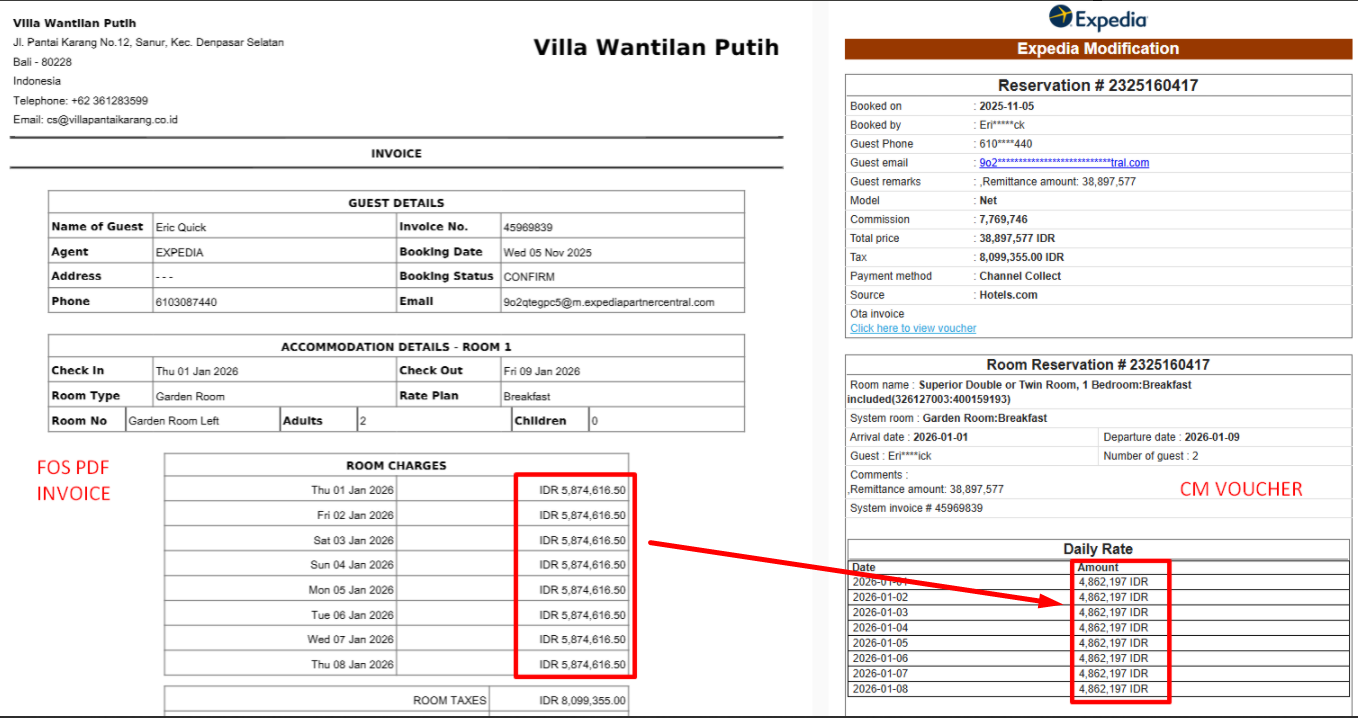
This runbook provide technical guide for investigation, resolve and verification disrepancy daily price between CM and voucher OTA.
- Condition: The issue occurs with reservation pull from OTA to CM, and there are sometimes discrepancy in the daily price between the CM daily price and the OTA voucher. According to the support team's reservation from
Expediafrequently experiences this issue. - Root cause hypothesis: This issue likely occurs during the process of retrieving reservations from the OTA to the application, and there is a problem with the calculation of the daily rate. Additionaly, there are different calculation methods used to determine the daily rate on OTA voucher.
2. Investigation
2.1. Check Booking History
Check the reservation history to ensure that there are no discrepancies in the reservation total and tax service fees when updated in reservation made through the OTA
Execute this query to extract all history reservation based on booking_id:
SELECT * FROM Bookings_history bh WHERE bh.Bookings_id = 45969839;
2.2. Check Logs in the Portal
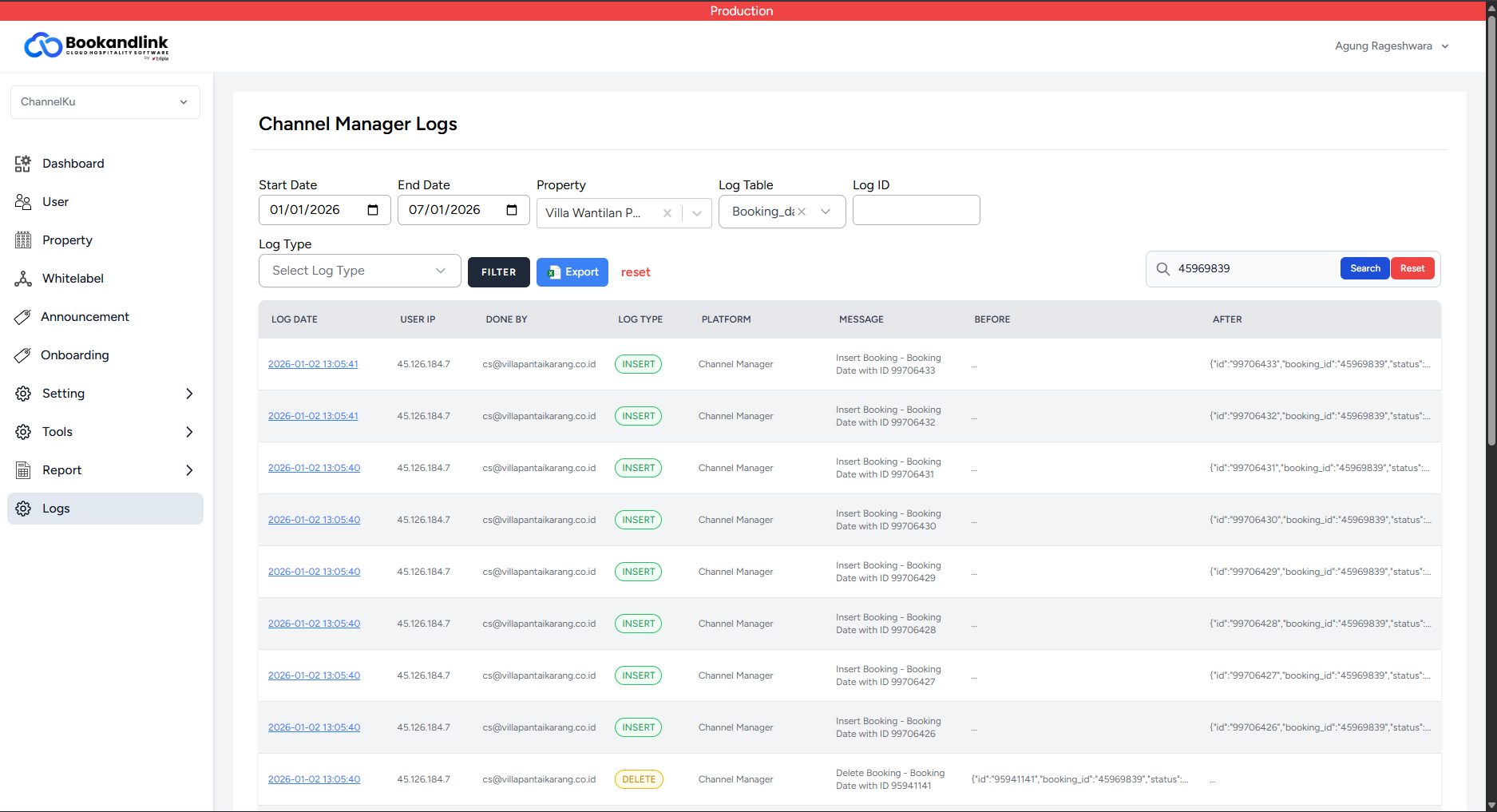
Review the reservation's booking dates log in the Portal to verify the pricing conditions. This allows you to check if the user manually updated the reservation price on the CM side.
Follow these steps to verify the CM logs in the Portal:
- Search Filter: In the Logs menu, locate the filter form. You can input the
booking_idinto the Log ID field, or use it as a keyword in the general search input. To narrow down your search, select theBooking_datestable from the Log Table dropdown. - Show Log Details: After applying the filters, click on the Log Date in one of the result rows to open and view the specific log details.
- Analyze Log History: Examine all existing log entries (both old and new) to fully understand the sequence of price changes that occurred on the CM side.
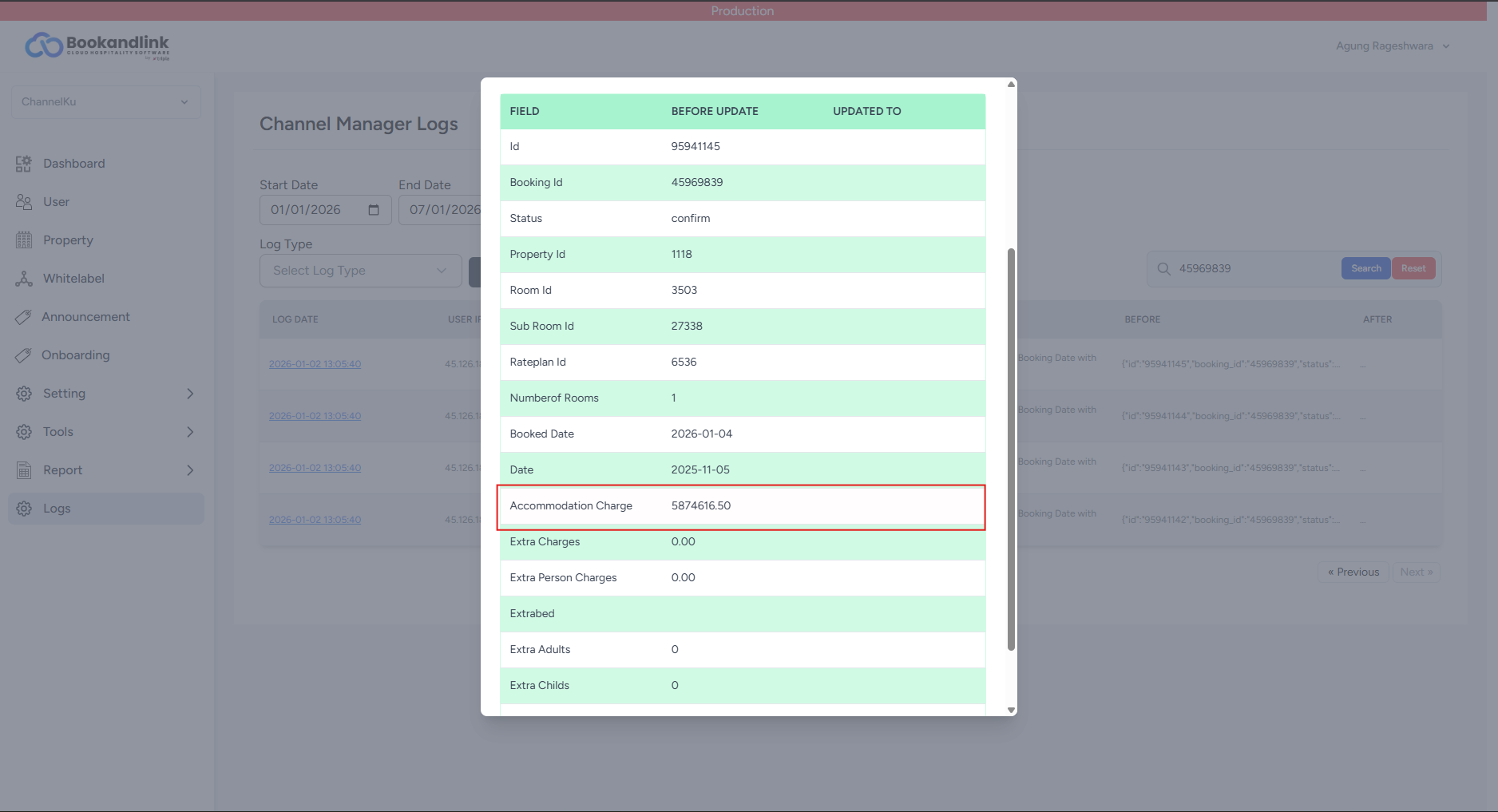
If the daily price now matches the OTA voucher, inspect the log entries recorded before the booking dates were replaced (DELETE and NEW INSERT) to investigate the historical data.
ℹ️ NOTE: If you are unsure about how to set the start and end date filters in the Portal, you can start with the date the reservation was made and add a one-week buffer.
2.3. Check extra_info in the Bookings Table
Once you confirm that the daily price in the CM matches the latest portal log, proceed to check the extra_info column within the Bookings table. Ensure that the daily price recorded here correctly matches the accommodation charge found in the Booking_dates table.
ℹ️ NOTE: extra_info Usage
- It is used to generate the daily price breakdown shown on the OTA voucher.
- The OTA accesses and parses this specific data string for daily breakdowns, which is a different method than how the CM retrieves its pricing data.
- Execute the following query to extract the
extra_infofor the reservation based on its ID:
SELECT id, extra_info FROM Bookings WHERE id = 45969839;
/* for compare price perday in CM side */
SELECT * FROM Booking_dates WHERE booking_id = 45969839;
ℹ️ NOTE: Below is an example of the expected extra_info data format:
/* Format: booked_date#price##booked_date#price */
2026-01-01#4862197.125##2026-01-02#4862197.125##2026-01-03#4862197.125##2026-01-04#4862197.125##2026-01-05#4862197.125##2026-01-06#4862197.125##2026-01-07#4862197.125##2026-01-08#4862197.125
- Compare the daily price data between the extra_info string and the price values in the Booking_dates table. If there is a discrepancy, we must flag it as a True Incident because the data between these two sources must strictly match
3. False Incident
3.1. Expedia Tax-Inclusive Rates
If the investigation reveals a price discrepancy but the reservation originates from Expedia, this should be flagged as a False Incident (False Alarm).
To verify the cause of the Expedia daily price difference, follow these steps:
- Access the Control Panel: Navigate to the Control Panel.
- Open the Expedia Configuration:
- If the property is not connected to Expedia: Select EXPEDIA from the dropdown menu, open the Expedia control panel, navigate to the Username tab, and input the
Hotel ID. - If the property is already connected: Simply open the Expedia control panel.
- If the property is not connected to Expedia: Select EXPEDIA from the dropdown menu, open the Expedia control panel, navigate to the Username tab, and input the
- Navigate to Settings: Once inside the Expedia control panel, go to the Settings tab.
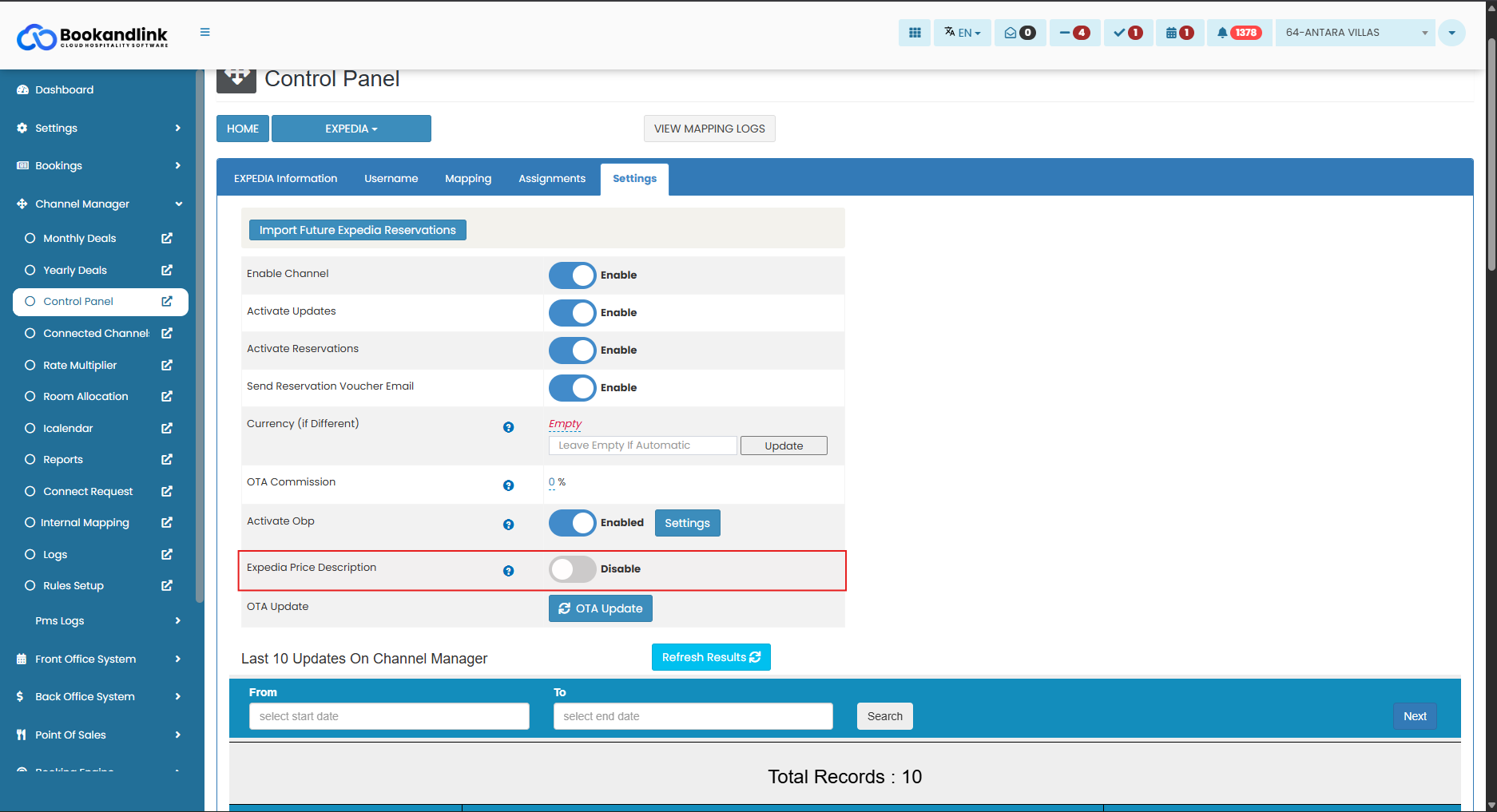
- Verify 'Expedia Price Description': Locate the
Expedia Price Descriptionsetting and check its status:- If
Disabled: The daily price on the OTA voucher is calculated inclusive of tax and service fees. (This explains the price difference).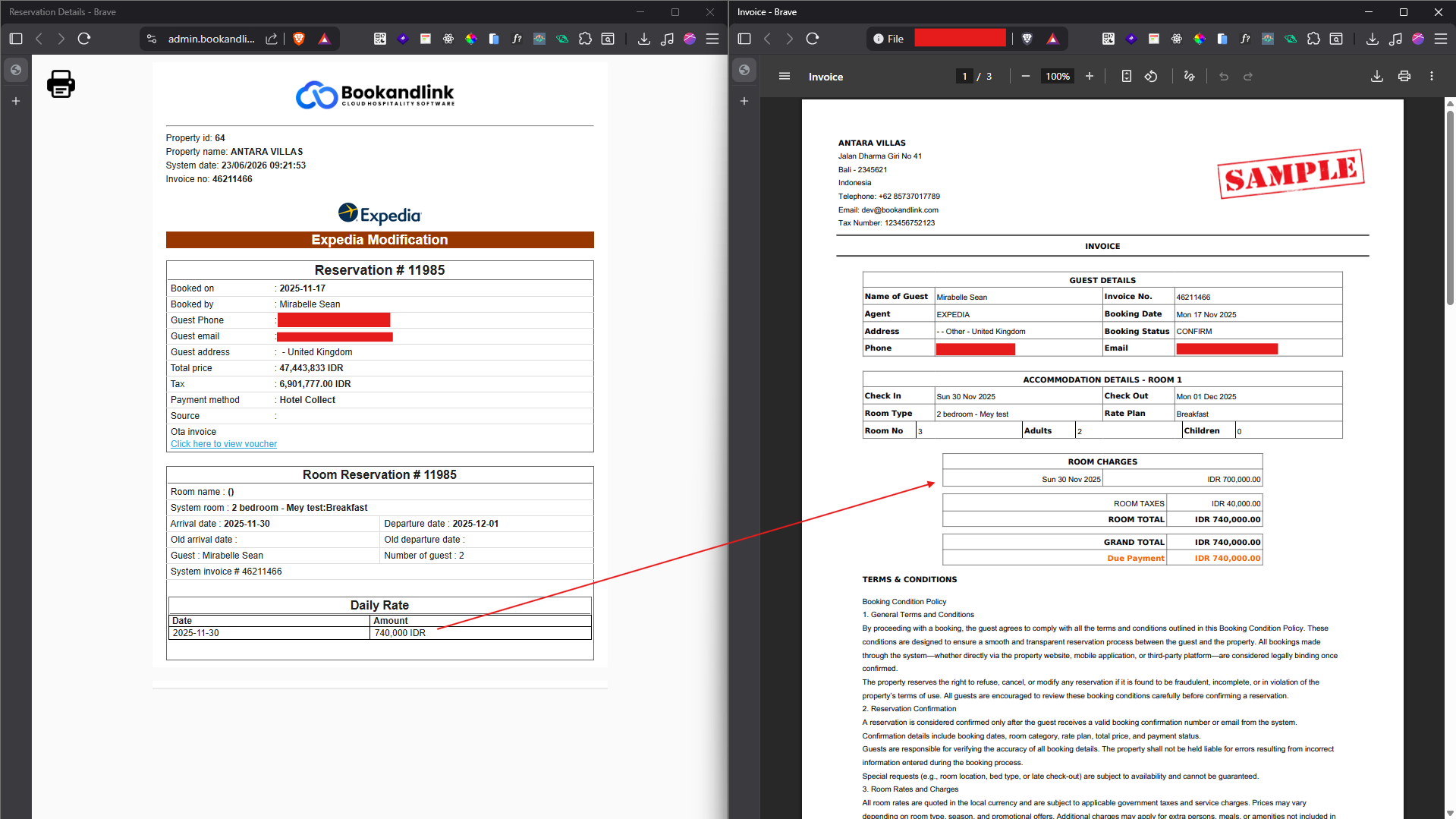
- If
Enabled: The daily price on the OTA voucher should match the base price breakdown in the CM exactly.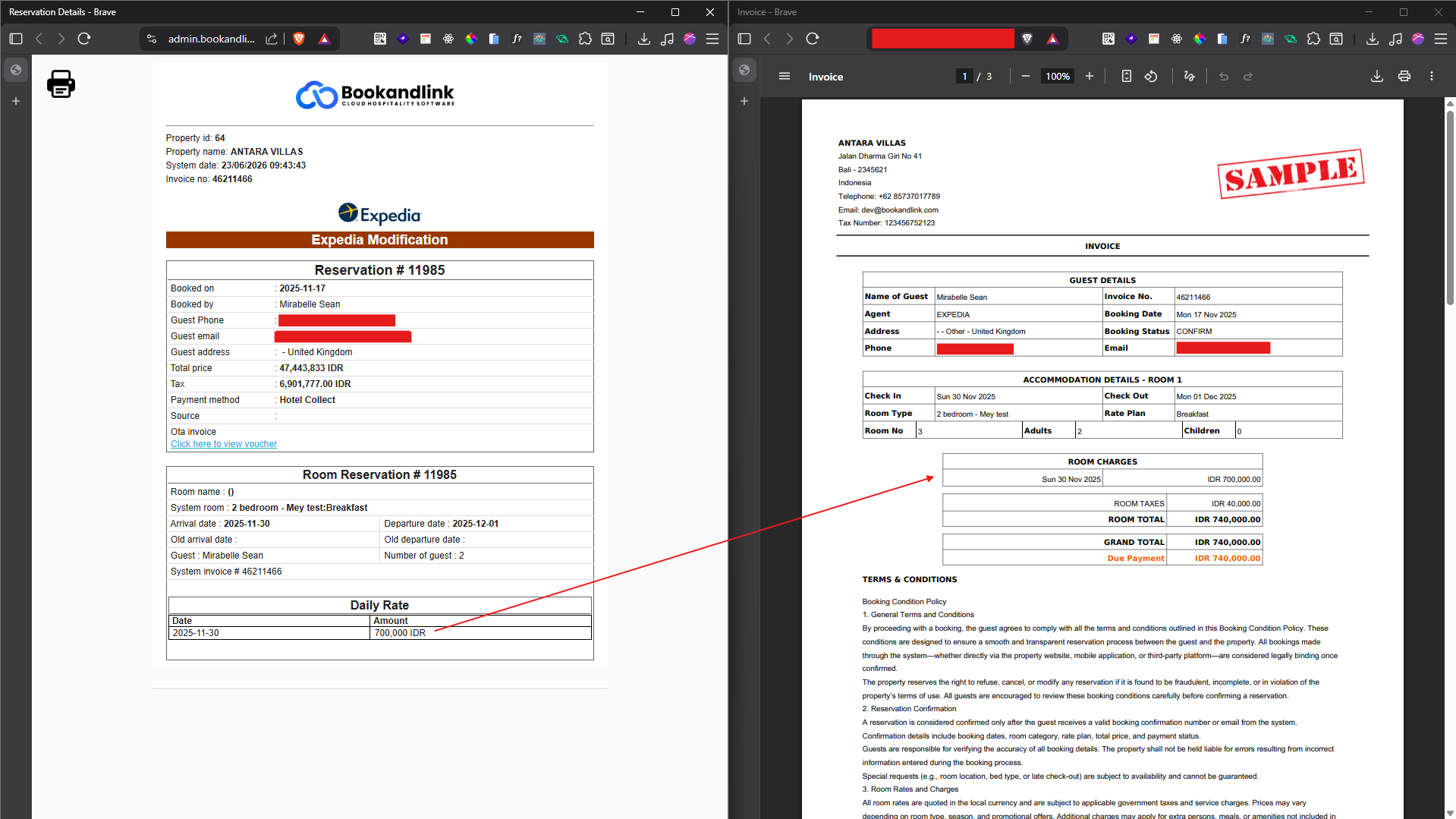
- If
4. True Incident
4.1. Handling Inconsistent Price
If your investigation confirms a True Incident caused by a discrepancy between the extra_info string and the Booking_dates table, follow these resolution steps:
- Escalate the Issue: Immediately report the finding to the Team Lead or Support Team.
- User Action Required: Advise the Support Team to instruct the user to manually update the affected reservation via the Booking Chart.
- Data Synchronization: By saving the update on the booking chart, the system will be forced to resynchronize, automatically correcting and matching the price values between
extra_infoand theBooking_datestable.
5. Post-Recovery Verification
After the user manually updates the reservation to synchronize the data, verify the following:
- Check Portal Logs: Review the logs in the Portal to ensure the
extra_infostring in theBookingstable and the daily price in theBooking_datestable have been successfully updated. - Compare Price Breakdowns: Check the daily price values on both the CM invoice and the OTA voucher. Ensure that both values match perfectly and there are no longer any discrepancies.