Runbook: Ikyu Scraping Blocked — Invalid Credential Set in Channel Manager
| Service | Ikyu Scraper / Channel Manager |
|---|---|
| Owner Team Slack Handle | @bnl-channel-integration @bnl_Link-japan-support |
| Team's Slack Channel | #bnl-channel-connection-alert |
Table of Contents
Important Links
| Alert | Slack notification from the Ikyu scraper — invalid credential warning (check the scraper notification channel) |
|---|---|
| Scraper Logs | https://argocd.bnlstg.com/applications/prod-channel-integration-ikyu?resource= |
| Control Panel Channel Manager | https://admin.bookandlink.com/control_panel |
| Metas (Block Key Storage) | Database table metas — query directly via production console or DB client |
1. Triage
The goal of this section is to quickly confirm whether the Ikyu scraping is failing due to an invalid credential stored in the Channel Manager Control Panel, and whether the account has already been blocked in Metas.
-
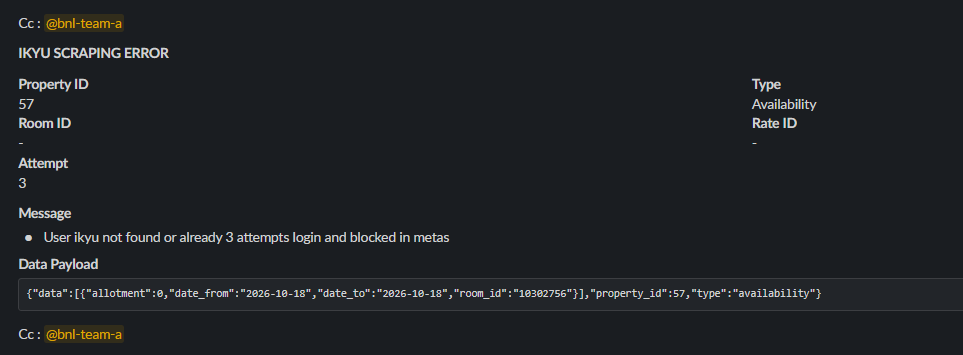
1. Check the Slack notification from the scraper:
- Open the Slack channel that receives notifications from the Ikyu scraper.
- Look for a notification mentioning that the Ikyu scraping attempt failed due to invalid credentials / wrong password.
- Note how many retry notifications have been sent:
- 1–2 notifications → The system is still retrying. Account is not yet blocked.
- 3 notifications → Maximum retries reached. Account has been blocked in Metas.
-
2. Verify the block status in the
metastable:- Connect to the production database via console or DB client.
- Run the following query to check if the block key exists for the affected hotel:
SELECT * FROM metas WHERE `key` = 'ikyu_failed_login' AND property_id = 64; - Is a record returned?
- ✅ YES → The account is currently blocked. Scraping has been fully stopped for this hotel.
- ❌ NO (0 rows) → The account is not yet blocked. The system may still be in the retry phase (fewer than 3 failed attempts).
-
3. Verify the credential stored in the Control Panel:
- Open the Channel Manager Control Panel: https://admin.bookandlink.com/control_panel
- Navigate to the Ikyu section for the affected hotel.
- Is there any visible indication that the credential was recently changed, or does it appear to be outdated?
2. Decision Point
Use the triage results above to determine the next course of action.
-
IF the Slack notification appeared AND the block key is present in Metas (3 failed attempts reached)...
- 🛑 Go to: True Incident — Account Blocked
-
IF the Slack notification appeared BUT the block key is not yet present in Metas (still in retry phase, fewer than 3 attempts)...
- ⚠️ Monitor closely. Notify the Japan team immediately so the hotel can update their credential before the 3rd failed attempt triggers the block. Proceed to True Incident — Credential Not Yet Blocked and follow the same steps to prevent the block from being set.
-
IF no Slack notification appeared and the scraper logs show no authentication errors...
- ➡️ Go to: False Alarm
3. False Alarm
The Slack notification was triggered, but upon checking the scraper logs and Metas, no authentication errors are found and the scraper appears to be running normally. This may be caused by a transient network issue during a scraping attempt that resolved itself.
-
Monitor the scraper logs for the next 15–30 minutes to confirm no further authentication errors appear: https://argocd.bnlstg.com/applications/prod-channel-integration-ikyu?resource=
-
Confirm no block key exists in the
metastable for the affected hotel's Ikyu account.- Run the following query via production console or DB client:
SELECT * FROM metas WHERE `key` = 'ikyu_failed_login' AND property_id = 64; - Expected result: 0 rows returned (no block exists).
- Run the following query via production console or DB client:
4. True Incident
The credential (password) stored in the Channel Manager Control Panel for the Ikyu account is incorrect. The scraper has failed to authenticate and has sent up to 3 Slack notifications. After the 3rd failed attempt, the system automatically blocks the account by storing a block key in Metas, stopping all scraping for the affected hotel. The first priority is to notify the hotel to update their credential, then remove the block in Metas once the correct credential is confirmed.
4.1. Recover the System
Root Cause: Wrong password/credential is stored in the Channel Manager Control Panel for the Ikyu account
Diagnostic Steps:
- Confirm the Slack notification was received and references an invalid credential / authentication failure for the Ikyu account.
- Check the scraper logs for repeated
authentication failedorinvalid credentialerrors for the affected hotel: https://argocd.bnlstg.com/applications/prod-channel-integration-ikyu?resource= - Verify in the
metastable whether the block key is already set by running the following query via production console or DB client:SELECT * FROM metas WHERE `key` = 'ikyu_failed_login' AND property_id = 64;- 1 row returned → The account is fully blocked.
- 0 rows returned → Still in the retry phase, not yet blocked.
Remediation Plan:
Step 1 — Tag the Japan Team on Slack to notify the hotel
The hotel is the only party who can update the correct Ikyu password in the Channel Manager. Notify the Japan team immediately.
Step 2 — Confirm when the hotel has updated the credential in the Control Panel
Wait for confirmation from the Japan team that the hotel has updated their Ikyu password in the Channel Manager Control Panel: https://admin.bookandlink.com/control_panel
Once the credential is updated, the system will automatically remove the block key from the metas table — scraping will resume without any further manual action from the engineer.
Step 3 — Verify the block key has been automatically removed from the metas table
When the hotel updates their credential in the Channel Manager Control Panel, the system will automatically delete the block key from the metas table. No manual deletion is required.
To confirm the automatic removal was successful, run the following query via production console or DB client:
SELECT * FROM metas WHERE `key` = 'ikyu_failed_login' AND property_id = 64;
- Expected result: 0 rows returned → The block has been lifted and scraping will resume automatically.
Verification:
- Confirm the block key no longer exists in the
metastable:SELECT * FROM metas WHERE `key` = 'ikyu_failed_login' AND property_id = 64;- Expected result: 0 rows returned.
- Monitor the scraper logs to confirm that the next scraping attempt for the affected hotel authenticates successfully: https://argocd.bnlstg.com/applications/prod-channel-integration-ikyu?resource=
- Expected log output:
Success login ikyu
- Expected log output:
- Confirm no new invalid credential notifications appear in the Slack scraper channel within the next 15 minutes.
4.2. Clean up
Once the correct credential is confirmed and the block has been removed, execute the following steps to close out the incident properly.
-
Verify the scraper is running normally again.
- Monitor the scraper logs for at least 15 minutes after removing the block key to confirm the Ikyu scraping process has resumed without errors:
[Link to pre-filtered scraper logs]
- Monitor the scraper logs for at least 15 minutes after removing the block key to confirm the Ikyu scraping process has resumed without errors:
-
Inform the team that the incident has been resolved.
-
Document this incident. Create or update the existing ticket with:
- Time the first Slack notification was received.
- Number of failed attempts before it was caught (1, 2, or 3).
- Whether the account was fully blocked in Metas or caught before the block was set.
- Time the hotel updated the credential in the Control Panel (which triggered the automatic block removal in
metas). - Time the scraper successfully resumed.
- Name of the affected hotel.