Runbook: Discrepancy revenue in revenue report & summary report
| Service | [Hotelku / Stay v1] |
|---|---|
| Owner Team slack handle | [@bnl-team-a] |
| Team's Slack Channel | [#bnl-teams-a - https://tripla-team.slack.com/archives/C08DWH5N4CR] |
Table of Contents
Important Links
| Page | URL |
|---|---|
| Revenue Report | https://admin.bookandlink.com/fos/revenue_report |
| Summary Report | https://admin.bookandlink.com/fos/summury_report |
| Support Discussion |
|---|
| https://tripla-team.slack.com/archives/C08D39UMYQ7/p1771839830359229 |
1. triage
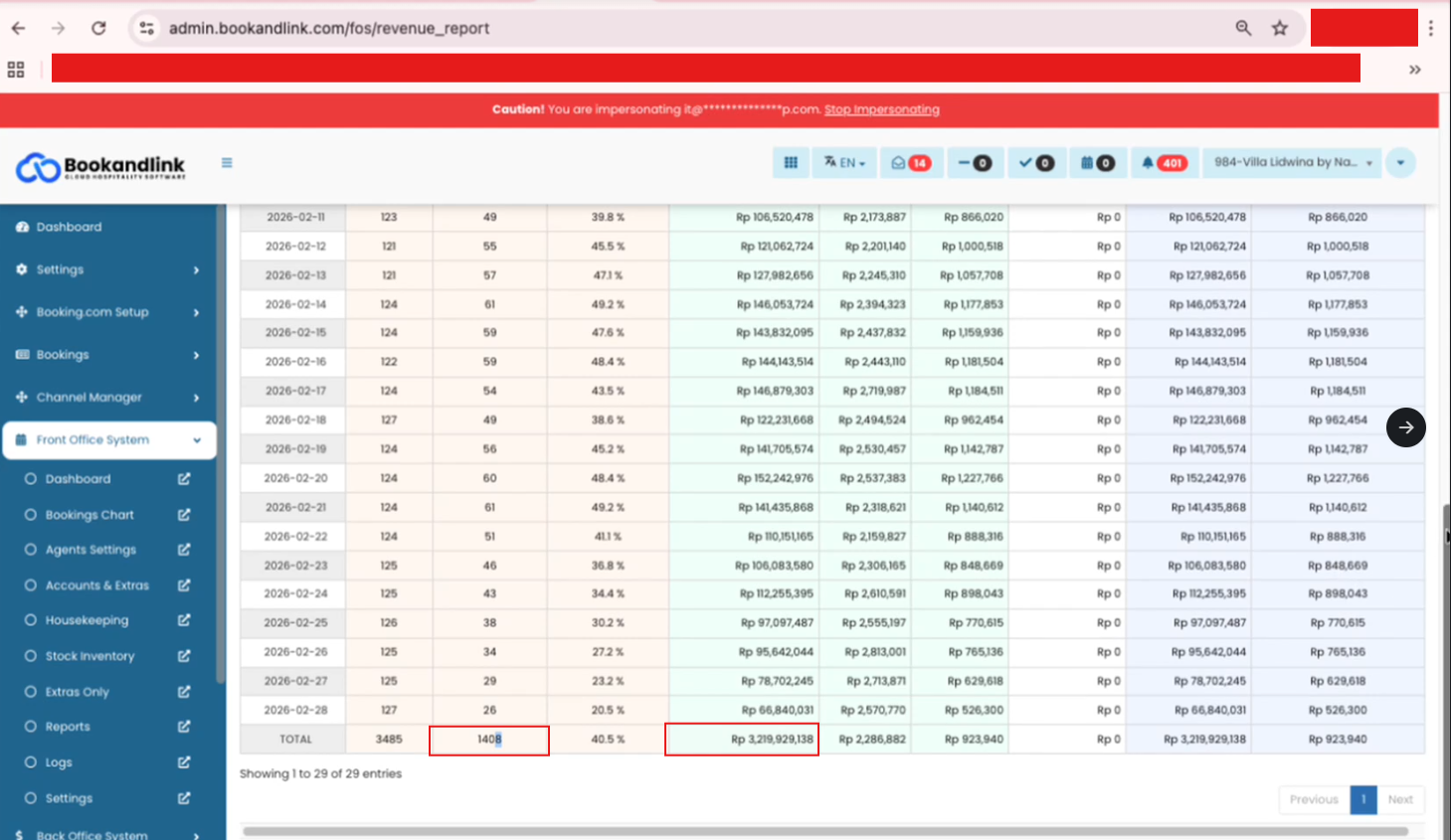
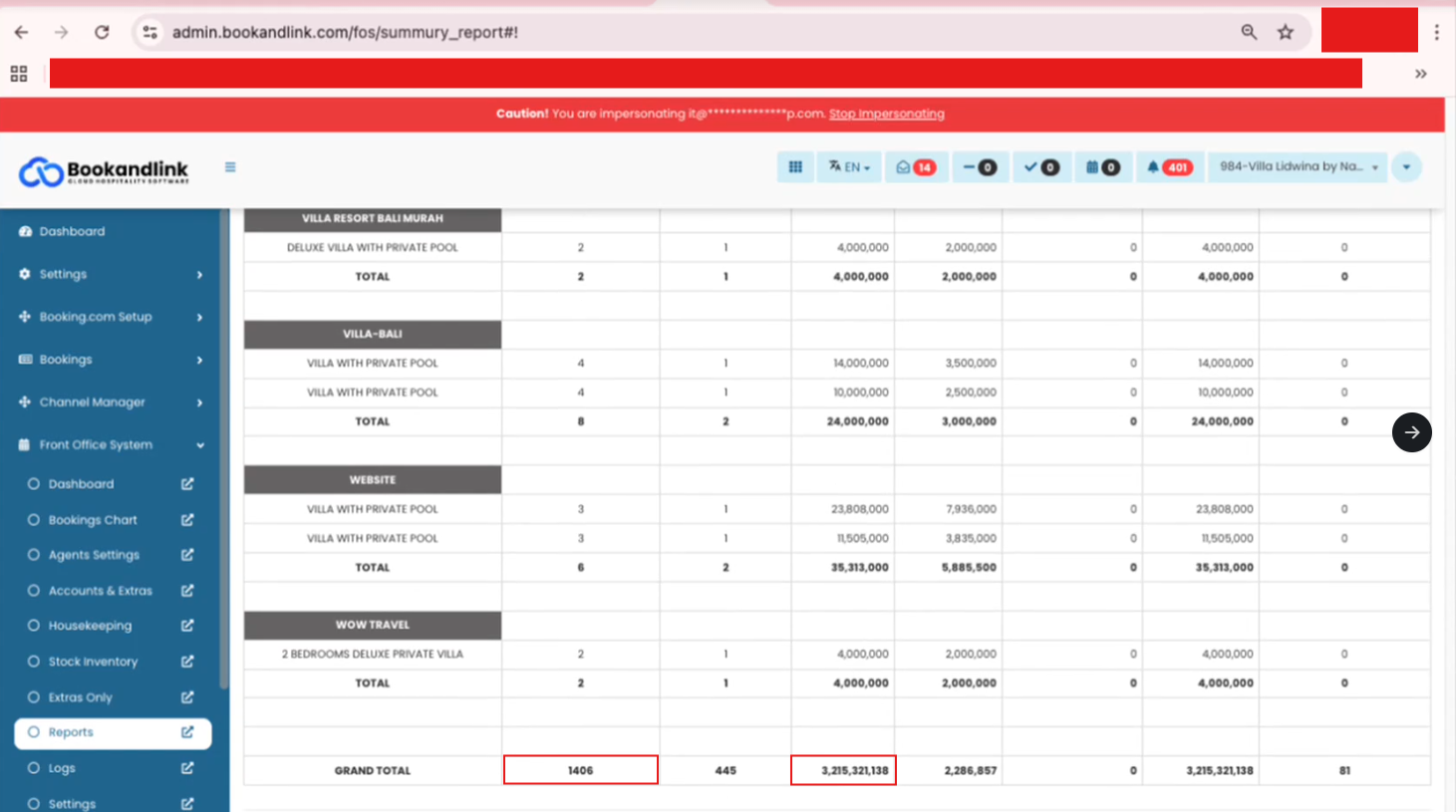
There is a discrepancy between the total revenue shown in the Revenue report and the Summary report. The root cause has been identified within the Booking dates data which contains inconsistent data as follows:
- Status mismatch: The status in the
Booking datestable is out of sync with the primaryBookingstable. for example, a booking marked ascancelin theBookingstable. but in theBooking datesis still appears asconfirm
1.2. Investigation plan
To investigate this issue, we need to perform a data audit between the Bookings and Booking dates table. This will allow us to identify and cross-reference the inconsistencies based on the criteria mentioned above.
- Check reservation data in database
- Execute query below to check reservation data purpose:
SELECT bd.id, bd.Booked_date,bd.Room_id,bd.booking_id, bd.status, b.booking_status
FROM Booking_dates bd
LEFT JOIN Bookings b ON b.id = bd.booking_id
WHERE bd.Property_id = 3967
AND Booked_date BETWEEN '2026-02-10' AND '2026-03-10'
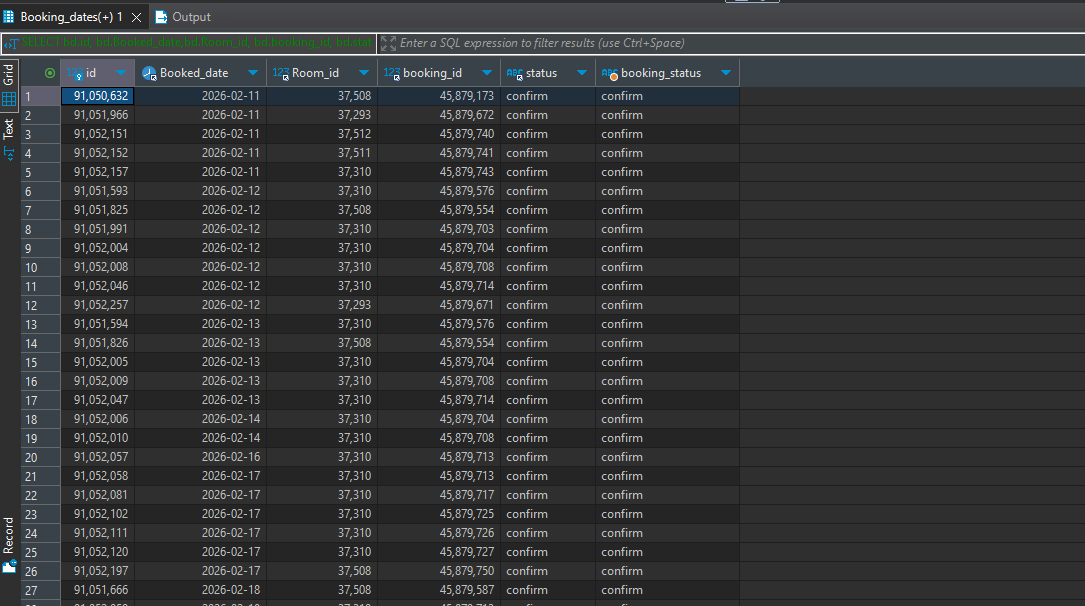
AND bd.status = 'confirm' - After executing the query, the result should look like the image below:
- Execute query below to check reservation data purpose:
- Identifying room causes
- Analyze the query results based on the two identified issues:
- Status mismatch issue:
- Compare the
statusfromBooking_dateswith thebooking_statusfrom theBookingstable. A discrepancy occurs whenstatusremainsconfirmwhile thebooking_statusis alreadycancelorunconfirm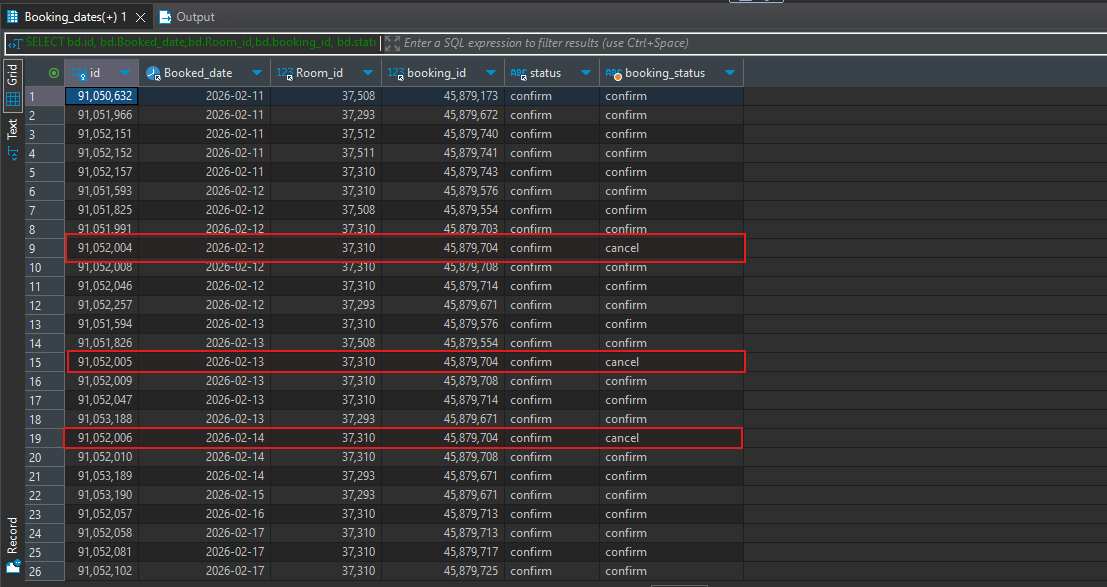
- Compare the
- Status mismatch issue:
- Analyze the query results based on the two identified issues:
2. Desicion Point
- If the revenue calculation in Revenue Reports has a different decimal value than the Summary Reports:
- ➡️ Go to: [#4. True Incident]
- If the discrepancy is only due to decimal/rounding differences:
- ➡️ Go to: [#3. False Alarm]
3. False Alarm
If the discrepancy is only due to decimal/rounding differences:
- No data fix required: There is no need to update the reservation data in the database.
- UI/UX Synchronization: The issue is likely caused by inconsistent rounding methods in the interface. The recommended action is to synchronize the rounding logic on the UI side.
4. True Incident
The issue is classified as True Incident when total revenue / total rooms sold show discrepancy between the Revenue Report and Summary Report that is not related to rounding.
4.1. Indentification Criteria
- Revenue Mismatch: There is a difference in the total revenue values between the Revenue Report and the Summary Report.
- Room Count Mismatch: The total number of rooms sold differs between the Revenue Report and the Summary Report.
- Data Integrity issue: The discrepancy is caused by the root cause identified, such as reservation status mismatches between
Bookingstable andBooking datestable
4.2. Recover system
Follow these steps to restore Revenue and Room Count accuracy if the mismatch is caused by reservation status inconsistencies:
- Identify Inconsistent Data: Identify reservations with differing statuses between the Bookings and Booking_dates tables (Please refer to section 1. Triagle).
- Locate Reservation: Once an issue is identified, copy the Booking ID and navigate to the Booking Chart page.
- Filter by ID: Go to the Bookings tab and enter the Booking ID into the Res # input field.
- Access Edit Mode: Once the reservation is found, click the Action menu, select Edit, and the reservation edit form will appear.
- Sync Status: If the reservation status is already set to 'cancel', simply click the Update Reservation button. This action will re-trigger the process to sync and update the status in the Booking_dates table.
4.2. Clean up
After updating the reservation to synchronize the status between the Bookings and Booking_dates tables, perform a final verification:
- Re-check Reports: Generate the Revenue Report and Summary Report again for the affected period.
- Confirm Accuracy: Ensure that the Total Revenue and Total Rooms Sold are now identical across both reports.